
Built from real process-serving, repossession, debt-collection and investigation workflows — not a generic job-tracking tool with your industry's name stapled on.
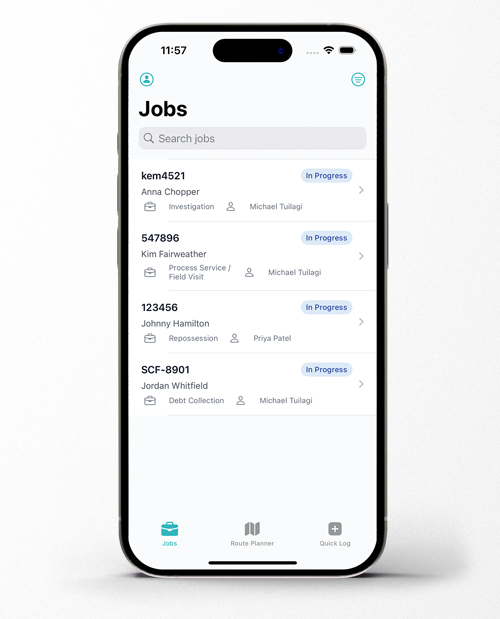
Job management

Built for every job type you run
Process-serving, repossession, debt collection and investigation jobs each have their own workflow.

Only the right agent shows up
Assigning an agent that doesn’t hold the correct licence will never be an issue again. Create a job, assign it to a field agent with the correct licence.

See who's actually nearby
Trackr will show you your closest agent to your debtor or defendant. You will never assign the wrong agent regardless of your geographic knowledge.

System generated, or set your own sequence
Every job picks up a reference number automatically the moment it’s created, numbered per agency — no manual job-numbering spreadsheet to keep in sync.

Forward an email, get a job note
Every job has its own email address — forward or CC something to it, and it lands as a note automatically. No copying, no pasting, no retyping.
From enquiry to invoice

Quotes and job requests, from your own website
Drop a quote calculator and a job-request form onto your own site. If you want cash-paying clients to pay up front, turn that on too — it’s a real payment through Stripe at the point of request, checked server-side before the job’s accepted.

Convert a request into a job in one click
Every inbound job request lands in a review queue. Accept one and it opens a job pre-filled with everything the requester already gave you — no retyping a defendant’s details out of an email.

Xero, one click to connect, two ways to sync
Connect your Xero account in one click — for most agencies, that’s the whole setup. Invoices push through automatically, and payment status flows back from Xero into Trackr too: mark something paid in Xero and Trackr picks it up on its own.

Mileage that adds itself to the invoice
Trackr works out the driving distance for every attempt automatically and suggests it as an invoice line, netted against your agency’s included radius and rate — one click to add it. It won’t double-bill an attempt that’s already been invoiced.

Track supplier costs against every job
Add suppliers and their contact details once, then attach their costs to invoices as you go.

No per-job fees, no job limits
Pricing is by seat, not by job — run as many jobs as your agency needs. Fair use applies for agencies running well above typical volume for their size, but there’s no meter counting you down.
Reporting & data

Information at a glance
Saved, chartable reports on job volume, turnaround time and revenue — build the view you actually want to check, not a fixed dashboard someone else decided was useful.

Your data, exportable on demand
Export any job list to CSV whenever you want, filtered by agency, client, status or date — not just when you’re leaving. If you do ever cancel, you get 30 days to pull a complete export of everything yourself.

Professional reports every-time
Turn rushed field notes into a clean, readable report with one tap. Opt-in, using your own agency-supplied Anthropic or OpenAI key — nothing sent anywhere unless you turn it on.

A real audit trail
Every change to a job — attempts, notes, financial assessments and more — is recorded behind the scenes with its own retention policy, kept for years rather than purged after a few weeks like a typical activity log.
Running more than one agency

Switch agencies, don't log in and out
If you own or work across more than one agency, connect them once and switch between them from the same login — no re-authenticating.

One map, every agency you own
The route planner shows every routable job across every agency you own at once — the one screen that genuinely combines them, rather than switching back and forth.
Trust & access

Two seats, right from the start
Your $50/month plan includes 2 staff seats. Agents and clients never count toward your seat count, no matter how many you invite.

We can't see your data unless you let us
Trackr’s own support team can’t view your jobs, clients or financials, and can’t log in as one of your users, without someone at your agency explicitly granting time-limited access — capped at an hour, revocable any time, and logged in your own Agency Settings.

Your data stays yours
Every query is scoped to your agency at the database level, not just hidden in the interface — there’s no path that lets one agency see another’s data outside the agency-connection feature you choose to turn on yourself.

Nothing gets double-logged
If a field agent’s connection drops mid-submission, retrying won’t create a duplicate attempt or a duplicate invoice line.

Email-verified sign-in
Login is backed by a one-time code sent to your email, not just a password on its own.

Hosted in New Zealand
Agency and client data lives in AWS’s Asia Pacific (New Zealand) region.