From enquiry to invoice

Quote to invoice, without retyping anything

From an embeddable quote calculator through to Xero-synced invoicing — see how Trackr takes a job from first enquiry to paid invoice without re-typing anything.
436
Embeddable quote calculator

Embeddable quote calculator

If a prospective client has to email or call before they know roughly what a job will cost, some of them just won’t bother. Trackr’s embeddable quote calculator and job-request form sit directly on your own website, using your own agency’s pricing catalog to give a real number, not a placeholder “contact us for pricing.”

If you take on cash-paying clients and want payment up front before you’ll accept the job, you can turn that on too — it’s a genuine Stripe payment collected at the point of request, verified on Trackr’s server before the request is even accepted, not a “pay later” link that’s easy to ignore.

Why a real number beats “contact us for pricing”

A prospective client weighing up two or three agencies rarely wants to start a conversation just to find out roughly what something costs. If your website makes them email or call to get a number, some portion of that traffic quietly picks the competitor whose site actually tells them. An embeddable calculator that runs on your agency’s own pricing catalog answers the “what would this cost me” question at the exact moment someone’s asking it, on the page they’re already looking at.

What it looks like for a visitor

Someone lands on your website, works through the calculator using your agency’s actual pricing — not a generic estimate — and gets a real figure. If they’re happy with it, the same form lets them submit the job request directly, with the details they entered already carried through. There’s no separate step where they have to re-explain what they just calculated to someone on the phone.

Taking payment before the job is accepted

For agencies that take on cash-paying clients, the calculator can be configured to require payment at the point of request rather than after the job’s been done. That payment runs through Stripe and is verified on Trackr’s server before the request is even accepted into your review queue — so it isn’t a “pay later” link an inconsistent payer can ignore, and it isn’t something a staff member has to chase up manually after the fact.

What happens after someone submits

A submitted request doesn’t create a job automatically — it lands in your job-request review queue, the same place any inbound enquiry ends up, whether it’s paid or not. Staff still accept or decline it there, and accepting still converts it straight into a job pre-filled with everything the requester already gave you, so nobody at the agency is retyping a defendant’s details out of a calculator submission any more than they would out of an email. The calculator changes what a prospective client sees on your website and, for cash-paying clients, whether they’ve paid before you even open the request — it doesn’t change how your office reviews what comes in or bypass that review step altogether.

Job request conversion

Job request conversion

An inbound enquiry through a contact form usually means someone at the agency retyping the defendant’s name and address out of an email into whatever system actually runs the job — a small, repetitive, error-prone step that happens dozens of times a month.

In Trackr, every submission from your embeddable job-request form lands in a dedicated review queue, not your inbox. Open one and you can accept or decline it. Accepting takes you straight into the job-creation form with everything the requester already gave you — defendant details, description, vehicle information where relevant — already filled in. You’re checking and assigning, not retyping.

Where inbound requests come from

Most inbound job requests arrive through the embeddable job-request form sitting on your agency’s own website — sometimes paired with the quote calculator, sometimes on its own. Whoever’s submitting it is typically a client or referrer who already knows the defendant’s details, the address, and roughly what kind of job it is; they’re just not inside Trackr yet.

The review queue, not the inbox

Every submission lands in a dedicated review queue rather than an email inbox, which means it can’t get buried under unrelated messages or missed because someone was away for a day. Staff work through the queue and either accept or decline each request, keeping a clear line between “someone asked us to do this” and “this is now an active job on our books.”

What accepting a request actually saves

Accepting a request takes staff straight into the job-creation form with the defendant’s details, description, and — where relevant — vehicle information already filled in from what the requester submitted. That’s the retyping this feature is built to remove: no copying a name and address out of a form submission into a separate job record by hand, and no risk of a typo creeping in during that manual transfer.

Declining without losing the trail

Not every inbound request should become a job — some are outside an agency’s coverage area or job type, some are duplicates of a request already actioned. Declining a request keeps it in the record as something that came in and was turned down, rather than deleting it outright, so there’s still a trail if a client or referrer follows up asking what happened to it. Agencies that take regular work from the same handful of clients or referrers benefit from the conversion flow doubly, because a referrer who sends jobs weekly isn’t retyped from scratch each time either — their client login lets them submit straight into the same queue rather than a new email to a new person every time. What could be a recurring administrative chore for a busy referral relationship — chasing details, confirming they’re complete, typing them in — becomes a two-click review on the agency’s side instead: read what came in, accept it.
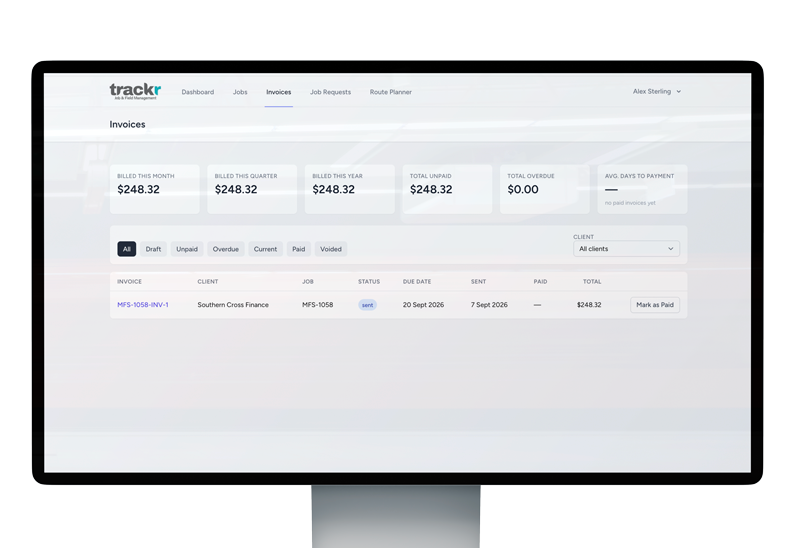

Xero Integration

Xero Integration

Plenty of “Xero integration” claims really just mean invoices get pushed one way and you’re on your own from there — if a client pays in Xero, you find out by checking Xero separately, or by someone remembering to update the job.

Trackr’s Xero connection is a single click to authorise for the common case of one Xero organisation, and it’s genuinely bidirectional from there. Approved invoices push through to Xero automatically. Payment and status changes flow back the other way too — mark an invoice paid in Xero and Trackr picks it up on its own, both in near-real time via Xero’s webhook and again on a scheduled check as a backstop, so a missed webhook doesn’t leave your records out of sync.

Add Xero for $10/month whenever you’re ready for it — it’s not part of the base plan, but nothing else changes if you don’t turn it on.

What actually reaches Xero

By the time an invoice pushes through to Xero, it’s not just a job total — it’s whatever line items your team built into it inside Trackr, including automatically calculated mileage for attempts and any supplier costs attached along the way, like a tow truck or storage yard fee on a repossession job. Xero receives the finished invoice with that detail already itemised, rather than a single lump sum your bookkeeper has to break back down after the fact.

What this looks like day to day

Once the connection’s authorised, the day-to-day work of chasing payment status mostly disappears. An office admin approves an invoice in Trackr and doesn’t need to separately log into Xero to push it across. When a client actually pays — whether that happens the same day or weeks later — Trackr picks the payment status up on its own rather than someone needing to remember to check Xero and update the job manually. Xero remains the source of truth for the accounting side; Trackr just stops requiring someone to manually keep the two in sync.

Why this matters for agencies specifically

Repossession, process-serving and debt-collection agencies typically bill a mix of standard fees, mileage and third-party costs on a single job, often for clients — law firms, financiers, referrers — who expect clean, itemised invoices rather than a lump sum to query. Getting that detail into Xero without someone manually re-keying it, and knowing it’s actually been paid without a manual check, matters more here than it would for a business invoicing a handful of flat-rate jobs a month.

Automatic mileage calculation

Automatic mileage calculation

Manually working out mileage for an invoice means someone either estimating it, or looking up a route after the fact and hoping they remember which attempts haven’t been billed yet.

Trackr does this automatically. When you build an invoice, it scans the job’s logged attempts, works out real driving distance (not a straight-line guess) between the attempt’s location and your agency’s nearest configured base, and nets that against your agency’s own included free radius and per-kilometre rate. Every eligible attempt shows up as a one-click “Add” line with the distance and dollar amount already calculated.

It also checks what’s already been billed — an attempt that’s already on a previous invoice won’t be suggested again, so there’s no manual cross-checking to avoid double-billing a client for the same trip.

Why this matters for process serving, repossession and debt collection

Field agents in this line of work regularly drive real distances — repeat attempts at the same address, jobs spread across a wide territory, repossession work that can mean multiple trips before a vehicle or asset is actually recovered. Mileage is a genuine cost of doing the job, not an incidental one, and it’s also genuine revenue an agency is entitled to recover. When working it out depends on someone remembering a route after the fact, it’s easy to under-claim simply because nobody wants to sit down and reconstruct a week’s worth of driving from memory.

How it handles agencies with more than one base

Distance is measured against your agency’s nearest configured base, not a single fixed office address. For an agency running out of more than one location, that means each attempt is netted against whichever base is actually closest to it, rather than every calculation being anchored to head office regardless of where the work happened. The included free radius and per-kilometre rate you’ve set still apply the same way — the base just changes to reflect wherever the trip realistically started from.

Where this connects to invoicing

Because mileage shows up as a ready-to-add invoice line rather than a separate calculation you have to reconcile by hand, it slots directly into whatever invoicing an agency is already doing in Trackr. For agencies that have connected Xero — an optional add-on — those invoice lines flow through the same sync as everything else, so mileage doesn’t end up as a manual top-up entry added outside the system after the fact.

Why the double-billing check matters as much as the calculation

Getting the distance right solves half the problem; the other half is not charging a client twice for the same trip. Because Trackr checks what’s already been invoiced before suggesting an attempt as a line item, an agency doesn’t need a separate manual process to cross-check old invoices before sending a new one. For a client relationship built on trust — particularly with referrers who send an agency repeat work — that kind of quiet accuracy matters more than it sounds like it should.

Supplier cost tracking

Supplier cost tracking

If your agency uses tow trucks, storage yards, locksmiths or other third parties on jobs, those costs need to end up on the invoice somehow — usually by someone re-typing a supplier’s name and rate every time.

Trackr lets you set up your suppliers and their contact details once, in your agency’s own catalog, then attach their costs to any job’s invoice as a line item. The supplier’s details stay consistent across every job that uses them, instead of being re-entered — and potentially mis-entered — each time.

Why this comes up specifically in repossession work

Repossession jobs routinely involve costs beyond the agent’s own time — a tow truck to move a vehicle, a storage yard to hold it, a locksmith if access is an issue. Those are real, billable costs, and they’re specific to the job, not a fixed rate you can just build into your standard pricing. Without somewhere to record them consistently, they end up on invoices in whatever form whoever’s billing that day chooses to write them — different wording, different rounding, sometimes forgotten entirely.

What this looks like when you invoice a job

Suppliers go into your agency’s own catalog once — name, contact details, whatever you need on file — rather than being typed out fresh on every invoice. From there, when you’re building an invoice for a job that used one, you attach that supplier’s cost as a line item pulled from the catalog entry, not retyped from memory. If the same tow company or storage yard comes up on ten jobs this month, the details are identical across all ten, because they’re coming from the same place each time.

How it fits with the rest of invoicing

Supplier costs sit alongside the other line items Trackr can add to an invoice automatically, including mileage — which works out real driving distance for each attempt and suggests it as a line item netted against your agency’s included radius and rate. Between the two, the parts of an invoice that used to mean digging through notes or a supplier’s paper receipt — travel and third-party costs — are things you attach with a click rather than reconstruct from scratch. If your agency also uses the Xero connection, an approved invoice with those line items pushes through automatically.

Unlimited jobs pricing

Unlimited jobs pricing

Software that charges per job punishes you for growing — the busier you get, the more it costs on top of what you’re already paying for seats. Trackr doesn’t do that. Your plan is priced by staff seat, and job volume doesn’t change your bill.

That comes with a fair-use expectation rather than an unlimited-forever promise with no context: pricing assumes typical usage for an agency your size, benchmarked around 400 jobs a month. There’s no meter running down and no automatic cutoff — if your agency is sustaining volume well above that on an ongoing basis, it’s a conversation about pricing that reflects it, not a wall you hit without warning.

How the pricing actually breaks down

An agency’s plan is $50/month, and that includes 2 staff seats from the start — no separate setup fee, no cut-down starter tier. If your office team grows past two people using the system, extra staff seats are $5/month each. Field agents and client contacts never count as seats at all, no matter how many you invite, and job volume doesn’t factor into the bill in either direction. The number that actually moves your monthly cost is how many staff seats your office needs — not how many jobs came in that month.

Why this suits agencies with variable job volume

Process-serving, repossession and debt-collection work isn’t evenly spread across the year for most agencies — court schedules, referral volume and seasonal patterns mean some months bring noticeably more jobs than others. A per-job pricing model turns a busy month into a bigger bill on top of already-busier staff, right when an agency least wants software costs working against it. Seat-based pricing means a quieter month and a busier month cost the same, and taking on more work doesn’t come with a corresponding software bill to plan around.

What happens if you’re consistently over the benchmark

The 400-jobs-a-month benchmark is there to make fair use concrete rather than vague — it’s not a hard cap, and nothing changes automatically if you go over it once or twice. If an agency is sustainably running well above that as its normal pace of work, month after month, that’s a case for Trackr to reach out about a pricing arrangement that actually reflects the volume — not a sudden lockout or a job counter appearing on your dashboard. Until and unless that conversation happens, the plan keeps working exactly as it did before.