Report and data

See exactly how your agency is running

Custom reports, on-demand CSV export, AI note clean-up and a real audit trail — see how Trackr gives you visibility into your agency's data, on your terms.
437
Custom reports & analytics

Custom reports & analytics

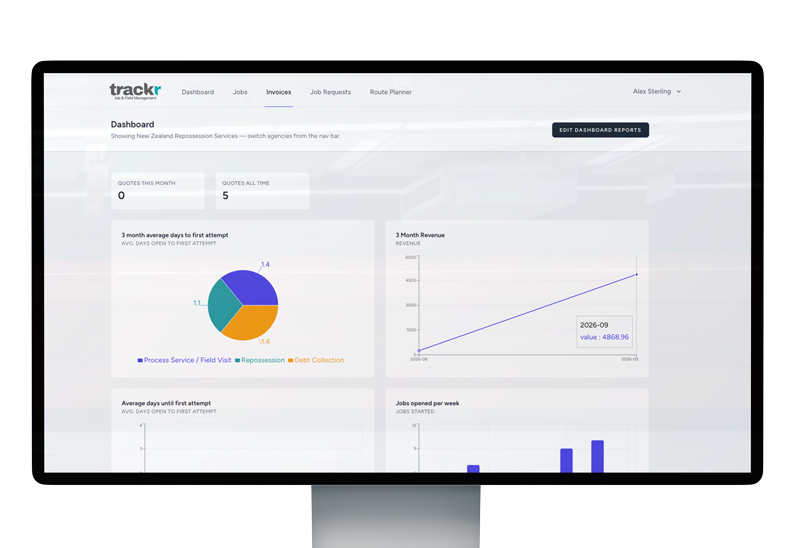
A dashboard someone else designed rarely answers the specific question you actually have this month — how many jobs opened and closed in a given period, how long jobs are taking from open to close, or what you actually collected.

Trackr’s reports are built and saved by you: chartable views (bar, line, pie, number or table) over job volume, turnaround timing and revenue, filtered by date range, kept for whenever you want to check them again, rather than exported to a spreadsheet and rebuilt from scratch each time. Revenue is staff-only — agents and clients never see it, same as invoices generally.

Why job volume and turnaround matter to running the agency

Referrers in process serving, repossession and debt collection often care about turnaround as much as outcome — how quickly a job moved from open to closed matters to a law firm or finance company deciding who to send the next batch of work to. Being able to chart that over a chosen date range, rather than guessing at it from memory or digging through individual jobs one at a time, is what turns “we’re generally pretty fast” into a number an agency can actually stand behind in a conversation with a client.

What it looks like in practice

A report is something you build once and keep, not something you reconstruct every time you want to check it. Pick job volume, turnaround time or revenue as the underlying metric, choose bar, line, pie, number or table as the view, set a date range, and save it. From then on it’s there whenever you want to look — a fixed dashboard someone else designed doesn’t need to anticipate every question an agency might have, because you’re the one deciding what gets tracked.

Why revenue stays staff-only

Revenue reporting follows the same visibility rule as invoices generally: agents and clients never see it. Field agents need to know what job they’re doing and where, not what it’s billing at, and clients are dealing with an agency, not auditing its internal finances. Keeping revenue reporting restricted to staff means the same reporting tool can be opened up more broadly for volume and turnaround — the metrics that are useful to look at as a team — without exposing figures that were never meant to be shared that widely.

How this differs from exporting the raw data

Reports and data export are answering different questions from the same underlying jobs. A saved report is for watching a trend over time at a glance — is turnaround improving, is job volume up this quarter — without leaving Trackr. Exporting is for when you need the underlying rows themselves, to hand to an accountant, build something custom in a spreadsheet, or satisfy a one-off request from a client. Most agencies end up using both: reports for the ongoing view, export for the specific ask.

Data export

Data export

Data export shouldn’t be something you only think about on the way out the door. Trackr lets you export any filtered job list to CSV any time — by agency, client, status or date range — for your own reporting, backups, or handing information to a client.

If you do ever cancel, that’s separate from your day-to-day export: you get a full 30-day window afterward to self-serve export everything — jobs, defendants, attempts, notes, document records, repo reports, financial assessments, clients, invoices and your team roster, as a set of CSV files — through Agency Settings, no need to ask support for it.

Why exporting isn’t just an offboarding feature

It’s easy to think of data export as the thing you reach for on the way out the door, but most of the actual use in an agency happens well before that ever comes up. A client asking for a record of jobs completed in a given month, an accountant wanting the underlying figures behind an invoice run, or an agency simply wanting its own backup outside Trackr — all of these are ordinary, regular reasons to export a job list, not signs that something’s going wrong.

What it looks like in practice

Filter a job list by agency, client, status or date range, and export it to CSV — the same filtering an agency would already use to find jobs day-to-day, just with a download at the end of it instead of a screen full of results. There’s no waiting on support to run a report or pull records together; it’s available whenever you need it, for whatever slice of jobs you’re actually asking about.

How this differs from custom reports and analytics

Export and Trackr’s saved reports are solving different problems with the same underlying data. A report is a chartable view you keep inside Trackr to watch something over time — turnaround, volume, revenue. Export is for when you need the actual rows themselves, outside Trackr, to hand to someone else or work with in a spreadsheet. If the question is “can I see this trend,” that’s a report; if the question is “can I have the data,” that’s an export.

What happens if you ever leave

If an agency does ever cancel, day-to-day export access is separate from what happens next: there’s a full 30-day window afterward to self-serve export everything — jobs, defendants, attempts, notes, document records, repo reports, financial assessments, clients, invoices and the team roster — as a set of CSV files, through Agency Settings. No email to support required, no waiting on someone to package it up. An agency’s data staying genuinely portable, even after the relationship ends, is as much a part of this feature as the day-to-day CSV export is.

AI note clean-up

AI note clean-up

Notes typed quickly in the field — often one-handed, often mid-job — don’t always read cleanly back at the office. Trackr’s AI rewrite feature turns rushed field notes into a clean, properly formatted report with a single tap.

It’s entirely opt-in per agency: nothing is sent anywhere unless your agency connects its own Anthropic or OpenAI key, and only the specific text you choose to rewrite is sent — never the rest of the job record.

Why field notes need a second pass

A note typed on a phone screen while standing on a doorstep, often one-handed and with somewhere else to be next, rarely comes out reading the way it would if it had been written back at a desk. Shorthand, missing punctuation and half-finished sentences are normal in the moment — the problem is that the same note might later be read by office staff preparing paperwork, or by a client trying to follow what actually happened on a job. AI note clean-up exists for that gap between what’s fast to type and what’s clear to read.

What it changes — and what it doesn’t

The rewrite is a formatting and clarity pass on what the agent already recorded, not a way of adding information that wasn’t there. It takes rushed, shorthand text and turns it into a properly formatted report with a single tap, using whichever wording best expresses what was already written. It’s a legibility tool, not a substitute for the agent recording the right details in the first place.

Staying opt-in and controlled

Nothing about this feature runs by default. An agency has to connect its own Anthropic or OpenAI API key before AI rewrite is available at all, and even then, only the specific piece of text an agent chooses to rewrite is sent to that provider — never the rest of the job record, the client’s details, or anything else on file. Agencies that don’t want any text leaving Trackr for a third-party AI provider simply never connect a key, and the feature stays dormant.

One thing worth knowing about recoverability

Because this is a live rewrite of existing text, it’s worth being precise about what’s tracked if something goes wrong. Trackr’s audit trail records changes to notes and other job fields, which covers most AI rewrites the same way it covers a manual edit. The one current exception is repo report fields specifically — a change there, including an AI rewrite, isn’t recoverable through the audit trail yet. Everywhere else, a rewrite that didn’t turn out right is the kind of change Trackr’s change history is built to catch.

Audit trail

Audit trail

Trackr keeps a real record of changes made to jobs, notes, attempts and financial assessments over time, retained for up to 7 years depending on the record type — long after a typical activity feed would have scrolled away and been forgotten.

Worth being precise about: this is a backend safeguard, not yet a log you can browse yourself inside the product — if you ever need to know what changed and when, that’s something to ask support for today, not a self-service screen. (One current exception worth knowing: repo report fields specifically aren’t covered by this yet, so a change there — including an AI rewrite — isn’t recoverable.)

Why retention this long matters for this kind of work

Process serving, repossession and debt collection all involve actions that can be challenged well after the fact — a defendant disputing whether they were actually served, a client querying an attempt that was logged months earlier, a financial assessment that gets revisited once a matter is finally resolved. A typical activity feed that scrolls away after a few weeks is built for day-to-day convenience, not for that kind of delayed scrutiny. Retaining change history for up to 7 years, depending on the record type, is built around how long these questions can realistically take to come up.

What “a change” actually covers

This isn’t limited to one type of edit. A job’s status being updated, an attempt’s details being corrected, a note being revised, or a financial assessment amount being adjusted all fall under the same change-tracking behaviour — the system is recording that jobs, notes, attempts and financial assessments changed over time, not just that they exist. That breadth matters because disputes rarely come from just one part of a job record; it could be the timing of an attempt as easily as a dollar figure on an assessment.

A backend safeguard today, not yet a self-service log

It’s worth being precise about what this is right now: a safeguard operating behind the scenes, not a screen inside Trackr where you can browse what changed and when. If your agency ever needs to know the history behind a specific change, that’s currently a request to support rather than something you look up yourself. It’s a real record, held for years — just not yet one you can query on your own.

The repo report exception

One current gap is worth flagging on its own: repo report fields specifically aren’t covered by this yet, so a change to one — including an AI-assisted rewrite through Trackr’s note clean-up feature — isn’t recoverable if it turns out to be wrong. Everywhere else in the system, change history is being kept even if you can’t self-serve it today; repo reports are the one area where a change, once made, is final.