
Multi agency route planner
The route planner shows every routable job across every agency you own at once — the one screen that genuinely combines them, rather than switching back and forth.
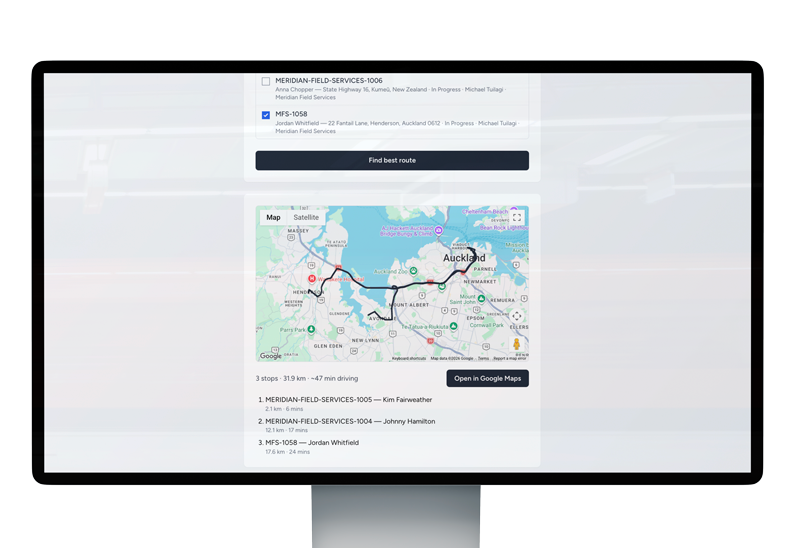

If you own more than one connected agency, the route planner is the one place in Trackr that doesn’t ask you to switch between them — it shows every routable job across every agency you own, on one map, at the same time. Plan a day’s route across your whole operation, not one agency at a time.
Why one map matters across agencies
Everywhere else in Trackr, working across more than one connected agency means switching which one’s active — each screen shows a single agency at a time, by design, so nothing bleeds between them. The route planner is the deliberate exception. Planning a day’s routes agency by agency, then working out overlap and travel time between them yourself, is exactly the kind of manual coordination that owning connected agencies should remove, not add — especially where two agencies you own cover overlapping or neighbouring territory and the efficient plan for the day only becomes obvious once you can see both at once.
What it looks like in practice
Open the route planner and every routable job across every agency you own appears on the same map, regardless of which agency it belongs to. From there, planning a route works the same way it would for a single agency — you’re just drawing from a bigger, combined pool of jobs rather than planning one agency’s day, switching, and planning the next agency’s day separately. A job’s agency of origin doesn’t disappear; it’s just no longer something you have to navigate around to see the full picture, or check separately, agency by agency, before deciding how to split up a day’s routes.
How it fits with the rest of route planning
The route planner draws on the same underlying job and agent data used elsewhere in Trackr — including nearest agent assignment, which sorts agents by distance from a job when you’re deciding who to send, and automatic mileage calculation, which works out real driving distance for each attempt once it’s logged, ready for invoicing. Combining agencies on the route planner doesn’t change how either of those works; it just means the planning stage itself isn’t scoped to one agency at a time the way assignment and invoicing still are.
The plan is combined; the jobs themselves aren’t
Seeing everything on one map at planning time doesn’t change what happens once you act on a job. Opening, updating or logging an attempt against a job still happens inside that job’s own agency, with the same agency data isolation that applies everywhere else in Trackr. The route planner combines the view so you can plan efficiently across your whole operation; it doesn’t merge the underlying records themselves, which stay exactly as separated as they would be for two agencies that weren’t connected at all.